Computing


0

My server has been a target of a DOS attack as of this morning. My hosting provider is working on fighting it at the moment. Access to the site will be unreliable until the attack is averted.

UPDATE (11/4/05):
Looks like the attacks subsided somewhat, while everything isn’t yet back to normal now, web access seems okay. There’s still some weird behavior with the databases…

0

In a demo of Visual Studio 2005, Microsoft claims that it is more expensive to use Eclipse (an open-source & free development tool) than buy Microsoft tools.

What a bunch of crap! Mike Milinkovich of the Eclipse Foundation recognizes that claims like this from Microsoft represent the highest compliment for Eclipse. I couldn’t agree more…


Repeating the Microsoft mantra that “free is not really free,” the programmer showed that while the basic development environment for Eclipse is free versus a basic Visual Studio 2005 license, which costs $8,200, the cost of using Eclipse increases as users tap into load testing and other advanced features.

When he added it up, the cost of using VS 2005 was over $30,000 versus more than $100,000 for Eclipse-based applications.

3

ZDNet reports that Firefox topped 10% of the browser market, though I’ve read reports that growth is slowing. It gives you an idea how hard it is to topple IE dominance.

This got me curious in terms of the distribution of browsers visitors to my blog use. Here’s some interesting stats. Firefox is #1 here… While I realize the stats are some what skewed since the large percentage of visitors are friends/family, it’s still good to see more firefox users out there!

Firefox 64.3 %
MS Internet Explorer 25.4 %
Netscape 3.8 %
Mozilla 3.5 %
? Unknown 3 %

On a related note, Firefox 1.5 release candidate is out… Navigation seems a bit quicker in the new version.

0

This is a fascinating finding by Mark Russinovich. His painstaking investigation reveals that a Sony Audio CD install some malware on his PC. It’s a really interesting read. He details the whole process step-by-step. Check it out as Mark’s investigative techniques are very impressive.

The anti-copy protection software is based on Rootkit which is used by hackers of viruses. It goes deep into the operating system and make itself “invisible.” It basically prevents uninstallation or deletion of itself and is therefore extraordinarily difficult to uninstall. In this particular case, removing it manually could shut off access to the computer’s CD player itself. It installed without the user permission nor notice. So it’s basically a virus, it is an intrusive compromise and it is nasty!

The length the record company goes through really infuriates me. While they have the right to protect their content, I have a problem when their tactic crosses the line of fairplay and infringe on consumers’ rights.

UPDATE #1 (11/2/05):
Looks like Sony is bowing to consumer pressure and will be working with anti-virus software makers to provide a patch to remove the software.

UPDATE #2 (11/11/05):
The first malicious trojan horses that piggy-backed on Sony CD walware were spotted yesterday. They enable the attacker to have complete control over the infected host. So the reality is the software from Sony CDs isn’t just about content protection anymore, it’s also enable PCs to be taken over by hackers!

California has already filed a class action lawsuit.

1

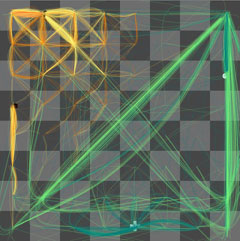
Check out Thinking Machine 4. It’s a chess playing program that displays what the computer is “thinking”. Very cool!

Of course, the computer isn’t really thinking. The program is a form of artificial intelligence. What it really does is compute all possible moves it can make and all possible moves its component can make in response to each of its move, and so on… This is known as a game tree. Each potential move is visualized by a line on the chess board in the program.

Back in my UCLA days, I spent a semester programming a checkers game using game trees like this one in my advanced programming class. The program can play checkers against a human or another program. At the end of the semester, we had a huge checkers tournament where each student’s program is pitted against other students in the class plus the professor’s. The tournnament represented something like 50% of the grade so the students (including yours truly) spent countless hours during the last few weeks tweaking and optimizing their algorithm. Mine used a rather simple but very effective algorithm and it went undefeated, beating the professor’s as well. (yes, I was a geek then too… ;))

I took 1 year worth of courses taught by this professor from the mathematics department. So when I graduated couple years later, I went to Dr. Mark Franzen and asked for a recommendation letter. He did remembered me and we had a pretty good chat. I remember that at the time, he was packing his office to leave for Chicago or somewhere else in the midwest that day. He gave me a nice letter of recommendation which I still keep to this day.

I was curious as to what Dr. Franzen is up to these days, so I googled and found that he’s left academia in the 90’s and founded two companies. He was a CEO for IntelRX somewhere in Wisconsin. Good for him…

4

I have been using Coppermine to manage my photos last few months. While powerful, its cool features are eclipsed by the overly complex interface. In addition, I had a hard time trying to integrate it with my blog. I ended up with two completely different skins for the blog & the gallery.

I stayed up late last 2 nites redoing my photo gallery. I dumped Coppermine and switched over to Gallery mainly because a plugin called WPG2 that enables photos from Gallery to be embedded within my blog. Finally, I used Peter Near’s theme for get the same look of my blog for gallery.

I had to spent a few hours hacking things a bit to get everything working together. So now, what do I get for 2 sleepless nites?

  • Uniform look for both the photo galleries & blog
  • Random image in the sidebar
  • Albums can be embedded in the blog
  • Individual photos can be embbedded in the blog

A few broken links here & there but I’ll get to fixing those later. I’ll take me a while to migrate all the photos. For now, things should be more seamless now. I’m quite satisfied with the result! 🙂

0

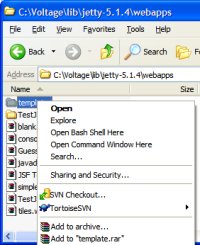
Bash HereMicrosoft has a Windows Powertoy that is basically a Windows shell extension enabling launching a command prompt for a selected folder. It’s really useful for command line users. I came across a way to add similar command for Bash shell. I think I saw this hack on one of the blogs last year. I only tried it on WinXP, so your milage will vary if you’re using older versions of windows.

The following assumes your Bash executable is installed on c:\cygwin\bin\bash.exe, replace that with the correct path on your system. Save the following to a file with .reg extension and simply double click it to install the registries. Once installed, you should see the “Open Bash Shell Here” command when you right click on a folder in Windows Explorer. Fairly straight forward.


Windows Registry Editor Version 5.00

[HKEY_CLASSES_ROOT\Directory\shell\bash]
@="Open Bash Shell Here"

[HKEY_CLASSES_ROOT\Directory\shell\bash\command]
@="c:\cygwin\bin\bash.exe --login -i -c 'cd "`cygpath "$*"`";bash' bash %L"

[HKEY_CLASSES_ROOT\Drive\shell\bash]
@="Open Bash Shell Here"

[HKEY_CLASSES_ROOT\Drive\shell\bash\command]
@="c:\cygwin\bin\bash.exe --login -i -c 'cd "`cygpath "$*"`";bash' bash %L"

0

Adobe Photoshop Elements (PE) started out as a poor stepchild version of Photoshop. Starting version 3.0 though, Adobe added photo management functionalities by merging Adobe Photo Album into PE. It has since grown into a full blown photo management/editing package.

I’ve been using Photo Album to organize my digital photos since version 1.0. So I was naturally looking forward to v4.0 when I first saw Adobe’s announcement of the upgrade last week. After rushing the kids to bed this evening, I got to spent about an hour playing with it and here’re my initial thoughts of the new version.

Editor
This forementioned part of the product is a stripped down version of Adobe Photoshop CS. While I don’t generally use this editor much anymore (I admit that I have become a CS bigot), I initially preferred the simplified UI of PE. For example, PE Editor has two modes: Standard and Quick Fix. Quick Fix is the idiot-proof mode designed for cousin Bubba. Basically, think of it as a “cookbook” of photo-editing “recipes” to fix common problems, as suppose to the free form editing of the standard mode. This mode is designed to appeal to beginners.

At the same time, I want to point out that with every release, more and more CS features migrate over to PE. In addition to the famous healing brush in v3, this new version adds more editing goodies like auto red eye removal and skin tone adjustment.

Organizer
The Organizer enables you to manage your photos. One of its best feature is the time line; basically it shows a history gram of monthly distribution of all your photos– very cool. I am almost certain that most people are used to include date/time as part of the file names to clue themselves with the chronology. You can do without that with an management software like PE. In fact, I find that I no longer care about file names; I stopped thinking in terms of a file system!

Organizer uses a tagging system as a fine grain management scheme. You can create tags to represent people, places, events etc… Tagging your photo enables you to recall a subset of photos later. For example, I can create a Katelyn tag and a Hawaii tag. Selecting these two tags later should recall Katelyn’s photos taken in Hawaii. Of course this tagging mechanism is only effective if you tag most if not all of your photos. Well, I’m too darn lazy to be consistent about tagging every imported picture.

The biggest gripe I have about PE is the fact that the tagging info isn’t written as meta data onto the photo file itself. I’m disappointed that v4 still write tag info to the catalog instead of the individual files. The main reason I want this behavior is so that I won’t lose my tagging info when my catalog database gets corrupted (it happened to me before), when I upgrade my OS or when I swap to another organizer software. I don’t like having a possibility of losing information painstakingly created.

To facilitate tagging, this new version introduces Find Faces. This is the cool idea that isn’t very well implemented unfortunately. Basically, the feature is suppose to scourge your selection of photos and isolate those with human faces so that you can tag them. It sounded cool but too good to be true when I first read about it, so I kept my expectations low. It works best with photos of decent contrast & lighting; in addition, it seems to only work with faces facing in the general direction of the camera. When I tried it with faces with a hat or sunglasses, it fails. The AI has room for improvement, but still this feature should save me some time with tagging.

It is worthwhile to note that v3 introduced Find Similar– another AI-based feature that I though was pretty cool. The idea is that given a photo, this command will fetch you the photos with similar color maps, contrast etc… For example, given a photo of a beach, it would find you other photos that have sandy tones with aqua colors of the ocean and blue shades of the blue sky. Again like Find Faces, Find Similar doesn’t work as advertised most of the time. It tends to be overly aggressive with its matching algorithm, including many photos that it shouldn’t.

V3 introduces the concept of version sets and photo stacks. I use these a lot. You can group a bunch of related photos into a stack. Normally, it’s displayed as one photo (top photo) with a stack icon. You can view the stacked photos as a group. Version sets is similar except that it’s used for group the different versions of the same photos. For example, if you post-process your photo, you’d end up with a version set of 2 photos (original + processed).

I had hoped that the Organizer would be faster but I didn’t detect any improvement so far. I shoot with a dSLR so my files are much larger than point & shooters. This is especially true lately now that I started to shoot RAW. So perhaps the big files are the reason I don’t see speed improvements.

Sharing
PE provides many different ways to share photos ranging from creating VCDs, web galleries, slideshows, greeting cards, and calendar. This version adds a pretty cool slideshow editor. With it, you can specify scene transitions and audio be it background music or narration. You can also configure a slideshow to pan & span photos ala Ken Burns’ documentaries. The slideshow can then be exported into movie files or burned into a VCD to be played on a DVD player. Very cool but it would be ultra cool if you can burn them as DVD; VCDs are just unwatchable for me (its quality is worse than VHS).

Yet another cool feature is online print. With a drag of a mouse you can send photo to online printing services (currently the only choice is Kodak, but Adobe is planning to add more) and mail them to your doorsteps, or to your friends & family. Very convenient.

Final Thoughts
All in all, v4 is an incremental upgrade. Nothing revolutionary and nothing I deem as gotta have. There a few unique new features that appeal to geeks like me. But with everything considered and with only a few hours of usage, I’d say that I am generally happy with the upgrade. Hopefully, new features like Find Faces and Tagging will be better with future releases.

As a photo management software suite, Photoshop Elements is a good deal. It’s far from perfect, but you can’t really go wrong considering its list price of $99 (so who pay full list price anyway). It has more functionalities than its peers– just short of a kitchen sink. Bottom line is that it does its job well: manage and fix the ever-increasing load digital photos.

0

monitorWow… This is just drop dead cool and it makes my double monitor setup at home just look dinky now… 🙁

0

So, after a 3 month-long downtime, I finally spent the time bringing my blog back online. I was forced to shut it down mainly because we moved in June and was without net access for some time as a result. Between the move & new job, reviving the blog was buried deep in my long to-do list.

Finally, it’s time to get to it and this time, I decided to stop running my own server– these pages now are being pushed to you by bluehost.com. First thing I will try to do is to post pictures from our Hawaii trip last week. It will take a few weeks before I manage to migrate my old blog content over and finish the design of the site. So in the meantime pardon the dust…

« Previous Page